LNG LogoLNG Logo
    • Enterprise App Development
    • Product Architecture Design
    • Data Engineering & Analytics
    • Cloud Consulting Services
    • AI-Enabled Applications
    • Remote Engineering Teams
    • UI/UX Design
    • Data Migration
    • Big Data
    • DevOps Solutions
    • Banking
    • Ecommerce
    • Fintech
    • Healthcare
    • Hospitality
    • Manufacturing
    • Telecom
    • Travel
    • Education
    • Cross-Platform & Web Development
    • Digital Experience Platform
    • Enterprise Technologies
    • Modern Frontend Interface
    • About Us
    • Blog
    • Our Team
    • Careers
    • Success Stories
Let's Talk !

Azure App Services: Simplified Cloud Application Hosting

By: Harsha ChadalwadaMay 22, 2020

My life has been super comfortable since I started using azure app service.It enabled me to build/host, Web Apps and Restful APIs in programming language of my choice, at equal speed. E.g., front end in angular, back end in .Net core.

This experience made me write this blog so I could share the cool features of app service, that I enjoy.


Why Cloud Hosting/Deploying? Cloud removes the hassle of maintaining and updating systems, allowing us to invest our time and resources into fulfilling core business strategies.

Some inbuilt features we can use without developing.

What is Azure App Service Plan?

• An App Service plan defines a set of computing resources for a web app to run.

• One or more apps can be configured to run on the same computing resources (or in the same App Service plan)

What is App Service?

• Azure App Service is a fully managed “Platform as a Service” (PaaS).

• PaaS helps developers and business users focus on build great apps with clicks & code without having to worry about infrastructure

• Azure App Service is One Integrated Offering where we can host Web Apps, Mobile Apps, Logic Apps & API Apps.

Key Features of Azure App Service

• Supports Linux and Windows platform

• Supports various programming languages

• Supports Multiple deployment methods

• Deployment Slots  & Deployment Options.

Creating Azure App Service from Azure Portal

• Overview of creating a new app service from the Azure portal.

step 1: Create New resource from azure portal.

step 2: Search Web App / Api App / Function App and select the desired one and select create

step 3: Choose the desired configuration and click on review and create, your brand new app will be ready in less than five minutes.

step 4: Verify app service status once deployed, we can also navigate to the app by clicking on the URL hyperlink.

App is ready and Running

What is a deployment slot?

• Deployment slots are live apps with their own hostnames, hosted in the same app service.

Advantages of deployment slots?

• You can validate app changes in a staging deployment slot before swapping it with the production slot.

• Deploying an app to a slot first and swapping it into production makes sure that all instances of the slot are warmed up before being swapped into production. This eliminates downtime when you deploy your app.

• The traffic redirection is seamless, and no requests are dropped because of swap operations.

• After a swap, the slot with the previously staged app now has the previous production app. If the changes swapped into the production slot aren’t as you expect, you can perform the same swap immediately to get your “last known good site” back.

• We can also use deployment slots for ab testing.
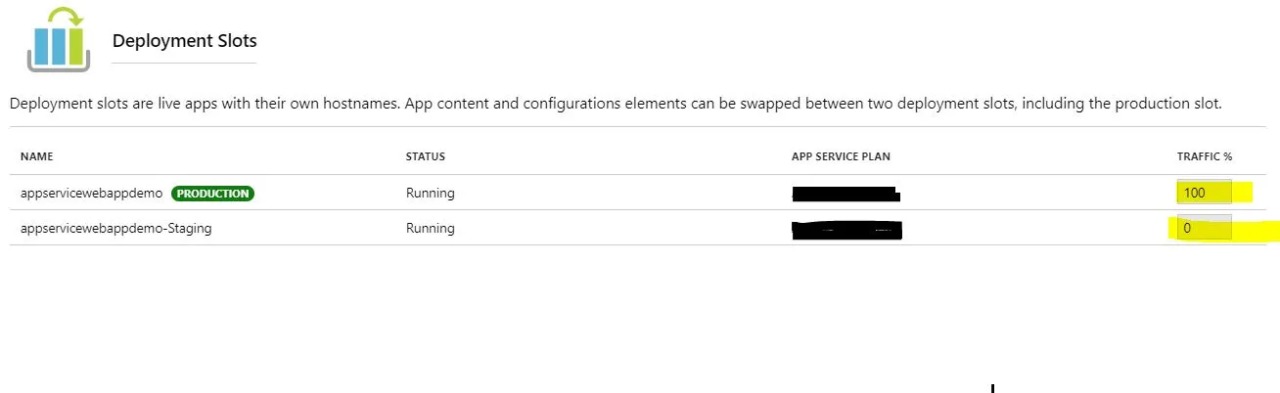
Azure deployment slots

Using Deployment Center for Continuous Deployment (CI / CD)
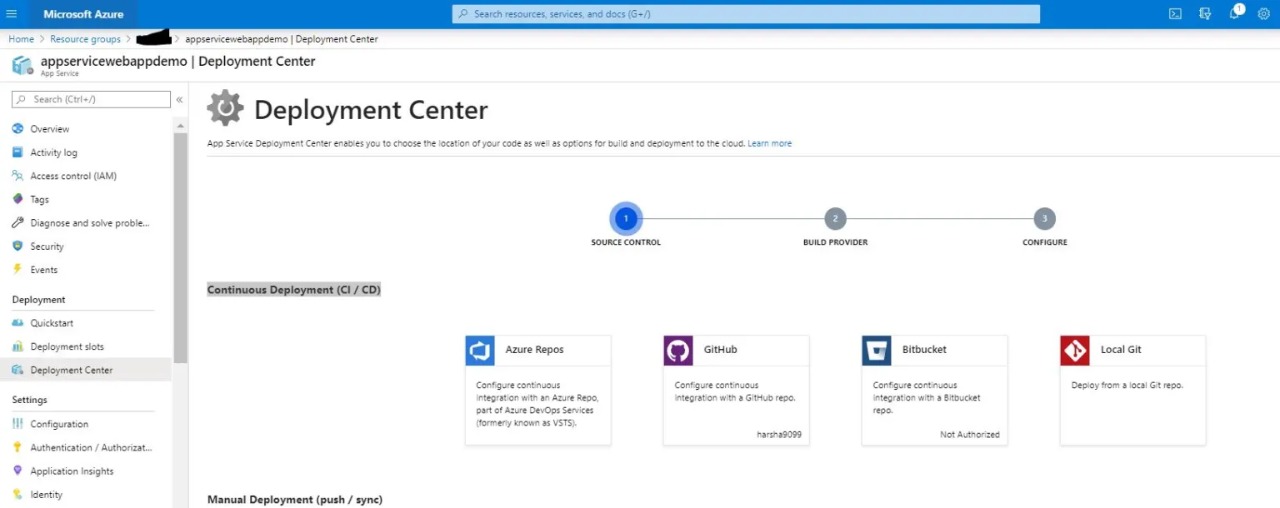
Deployment source control options

step 1 : GitHub as Build Provider and click on continue
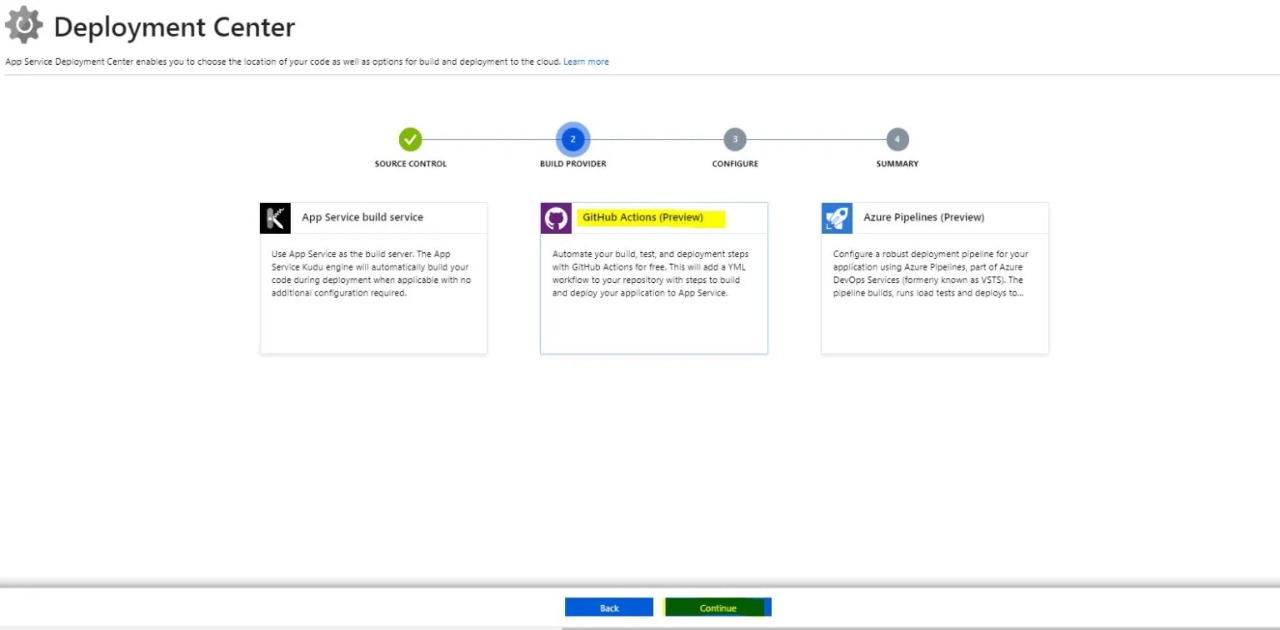
Deployment center build options

step 2 : Configure GitHub Repository and click continue
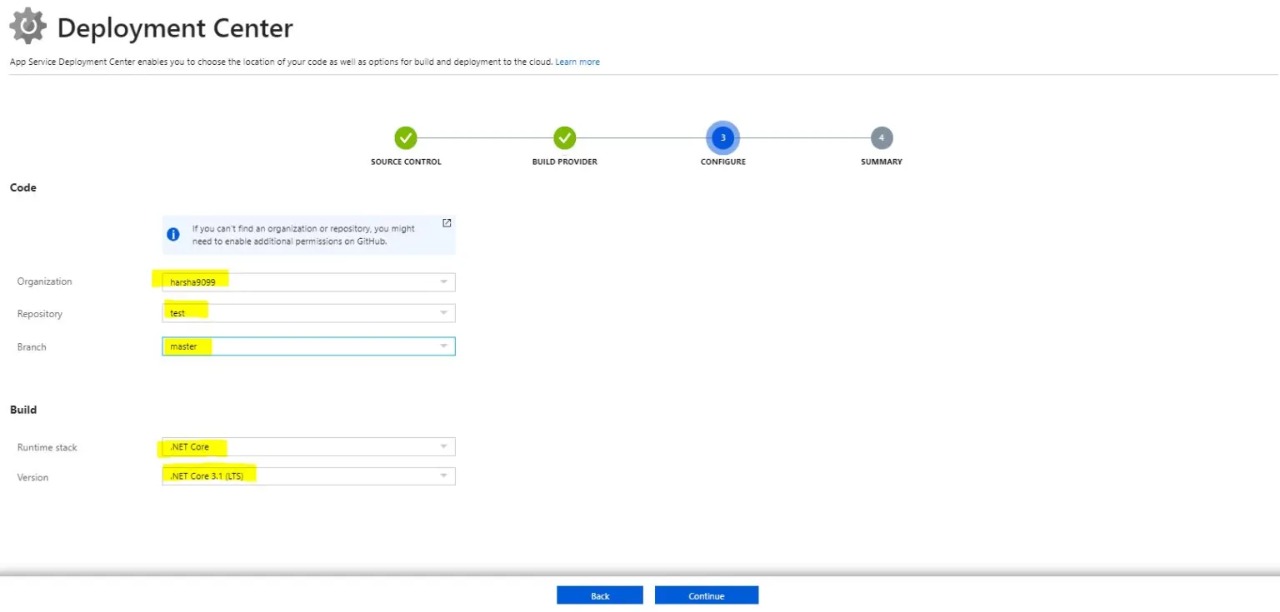
Azure Deployment Center configuration

step 3: Review workflow configuration and click finish
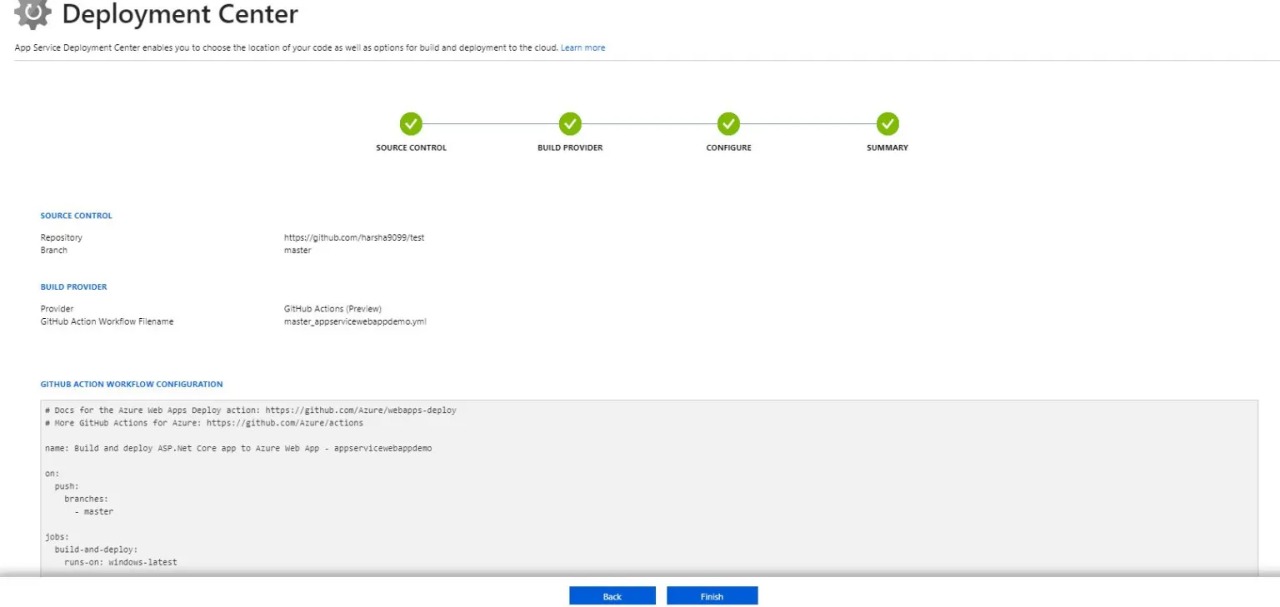
Deployment Center setup

step 4: once setup is done you can see deployment center with latest deployments
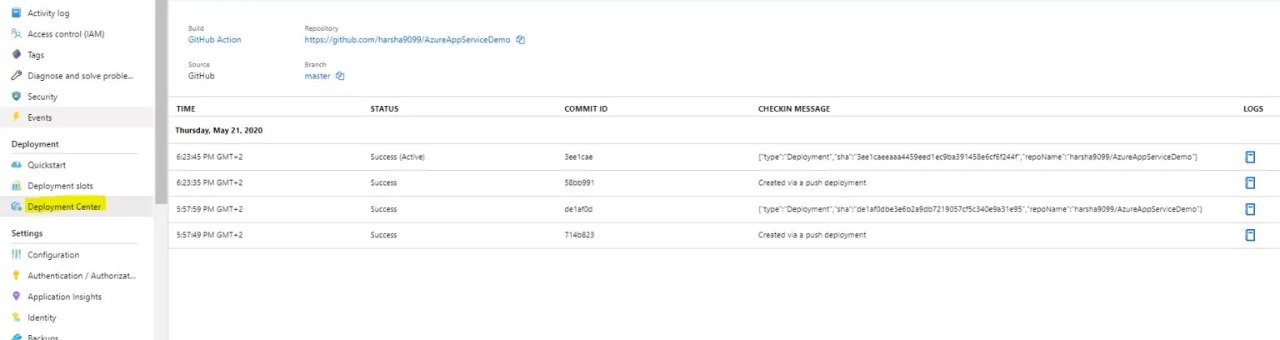
Deployment history log

step 5: Verify the build status in GitHub

Since we set up a build provider(GitHub) as soon as we commit changes to the master branch deployment center triggers the build automatically.
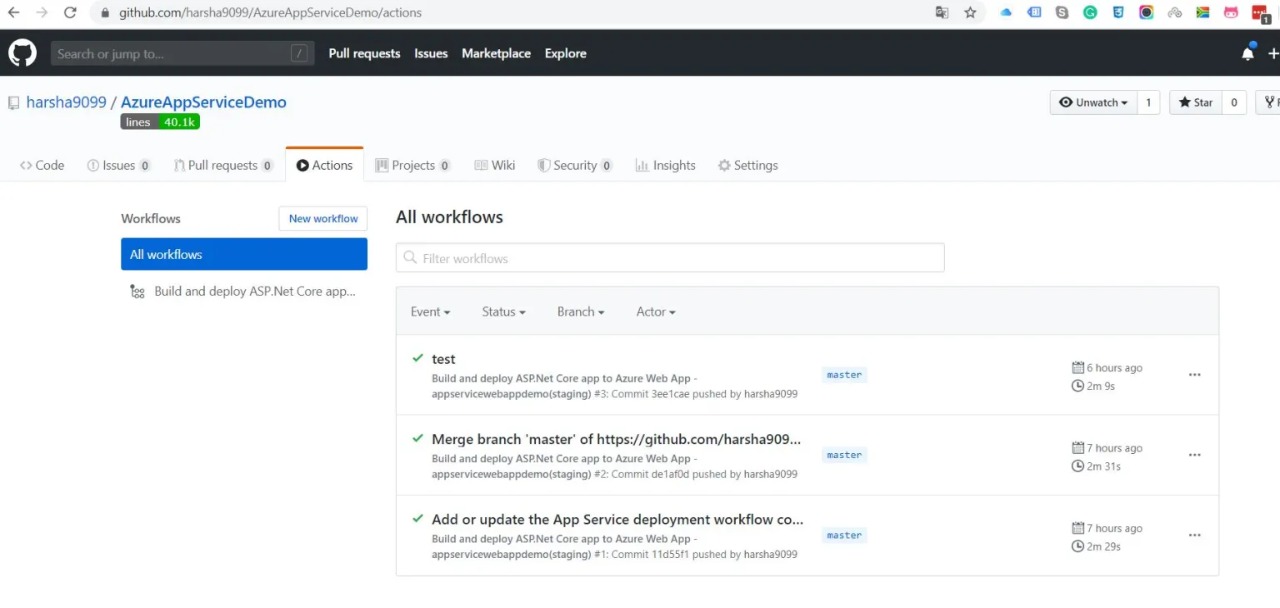
builds triggered for each and every commit to master branch

Hosting Multiple Websites on one app service

• Sometimes it’s necessary to host multiple sites under the same parent address, in Azure this can be done by deploying multiple projects to separate folders within a single Web App.

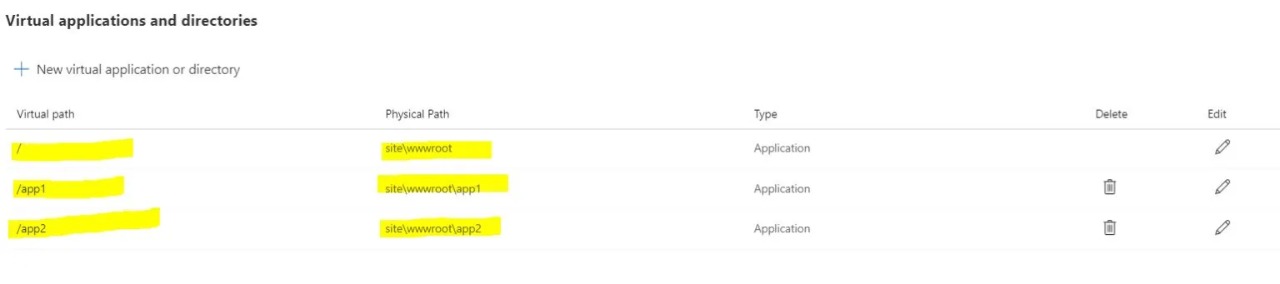
Azure virtual application configuration
Default View Of Virtual Application Configuration in Azure App Service
Virtual app paths configuration
Multi Application View Of Virtual Application Configuration in Azure App Service

• Root Site Publish Settings

• App1 Publish Settings

modify root site publish settings as highlighted

• App2 Publish Settings

modify root site publish settings as highlighted

• with the above configuration changes we can host easily from visual studio web deploy.

Topics Covered…

• What is App Service and App Service Plan?

• Creating Azure App Service from Azure Portal

• Deployment Center for Continuous Deployment (CI / CD)

• Using Deployment slots.

• Hosting multiple website on one app service.

• Publishing apps into app service from visual studio.



Azure App ServiceDeployment Slots
Two CMSs, One Website: Managing Routing During WordPress to Sitecore MigrationJune 17, 2026Mastering Identity Resolution in Sitecore CDP: Anonymous to Known VisitorsMay 25, 2026

Let's Innovate, Collaborate, Build Your Product Together!

We turn your unique ideas into exceptional results. Contact us to
scale your tech capacity and accelerate business growth.

Let's Talk!
Where We Are

Our Global Presence

Delivering world-class digital solutions from three strategic locations across the globe.

South AfricaSouth Africa
ZACape Town

4th Floor, Mutual Park, Pinelands, Capetown, South Africa - 7405.

UAEUAE
AEDubai

FZCO 421, Dubai Commercity, Dubai, United Arab Emirates.

IndiaIndia
INAmritsar

SCO 6, Floor - 5, Dua Square, Ranjit Avenue, Block - B, Amritsar, Punjab, India - 143002

Logo

AI-Fuelled software agency, helping business professionals to thrive. Trusted by global leaders.

Company

  • About Us
  • Blog
  • Our Term
  • Careers
  • Success Stories

Services

  • AI-Enabled Applications
  • Big Data
  • Cloud Consulting Services
  • Data Engineering & Analytics
  • Data Migration
  • DevOps Solutions
  • Enterprise Application Development
  • Product Architecture Design
  • Remote Engineering Teams
  • UI/UX Design

Industries

  • Banking
  • Ecommerce
  • Fintech
  • Healthcare
  • Hospitality
  • Manufacturing
  • Telecom
  • Travel & Transport
  • Education

Technologies

  • Cross-Platform and Web Development
  • Digital Experience Platform
  • Enterprise Technologies
  • Modern Frontend Interface
Logo

AI-Fuelled software agency, helping business professionals to thrive. Trusted by global leaders.

Company
  • About Us
  • Blog
  • Our Term
  • Careers
  • Success Stories
Services
  • AI-Enabled Applications
  • Big Data
  • Cloud Consulting Services
  • Data Engineering & Analytics
  • Data Migration
  • DevOps Solutions
  • Enterprise Application Development
  • Product Architecture Design
  • Remote Engineering Teams
  • UI/UX Design
Industries
  • Banking
  • Ecommerce
  • Fintech
  • Healthcare
  • Hospitality
  • Manufacturing
  • Telecom
  • Travel & Transport
  • Education
Technologies
  • Cross-Platform and Web Development
  • Digital Experience Platform
  • Enterprise Technologies
  • Modern Frontend Interface

Copyright © 2026 L&G Consultancy. All Rights Reserved.
Privacy PolicyTerms and Conditions
Company Image