What is Apache Solr?
Available since 2004, Apache Solr is an open-source search platform,written in Java language, which is used to build search applications. It is built on top of Lucene (full text search engine). Solr is enterprise-ready, fast and highly scalable.
Not only search, Solr can also be used for storage purpose. Like other NoSQL databases, it is a non-relational data storage and processing technology. You can say, Solr is a document structured database.
Why Solr?
I was thinking if Lucene is there, then why we got a need of Solr? The answer is simple: Lucene is a full-text search engine library, whereas Solr is a full-text search engine web application built on Lucene.
Lucene exposes an easy-to-use API while hiding all the search-related complex operations. Any application can use this library, not just Solr. So, Solr uses Lucene under the hood and basically Lucene has no clue about the Solr API.
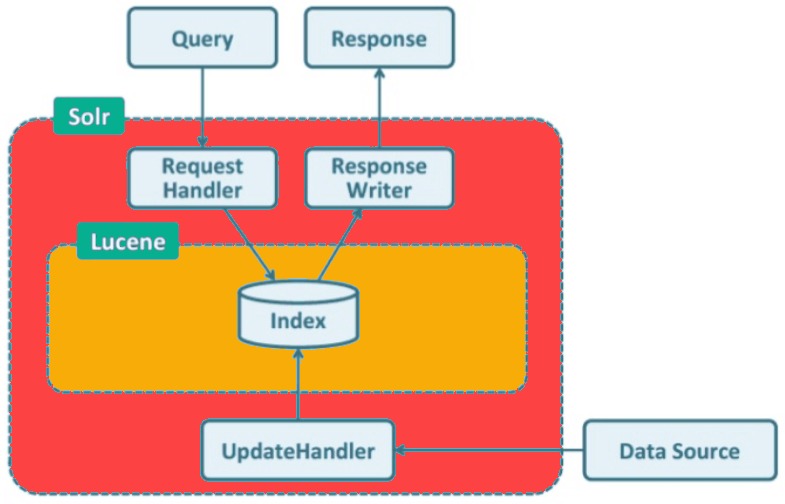
Solr has RESTful XML/HTTP and JSON APIs and client libraries for many programming languages such as Java, Phyton, Ruby, C#, PHP, and many more being used to build search-based and big data analytics applications for websites, databases, files, etc.
Solr Terminologies:
Below are the basic terminologies used in Solr:
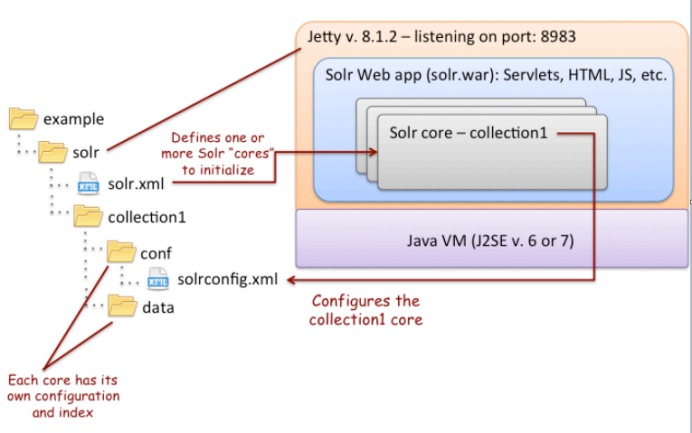
- Solr Instance : Solr Instance is an instance a Solr running in the Java Virtual Machine (JVM). In Standalone mode, it only offers one instance whereas in cloud mode you can have one or more instances. The home directory of Solr provides reference to each of these Solr instances, in which one or more cores can be configured to run in each instance.
- Solr Core : Solr Core can be defined as an index of texts and fields derived from all the documents. One Solr Instance may have single or multiple Solr Cores.
Each Core = an instance of Lucene Index + Solr configuration
- Indexing : Indexing is a method for adding document’s content to Solr Index.
- Document : It is a group of fields and their values. A document is a basic unit of data stored in Apache Core. One Apache core may contain one or more Documents.
- Field : The field is a key-value pair that stores the actual data in a Document. Key specifies the field name and value contains that Field data. A document may have a one or multiple fields. It is used by Apache Solr to index the document content.
Important Configuration Files:
- Solr.xml : It is the file in the $SOLR_HOME directory that contains Solr Cloud related information. To load the cores, Solr refers to this file, which helps in identifying them.
- Solrconfig.xml : This file contains the definitions and core-specific configurations related to request handling and response formatting, along with indexing, configuring, managing memory and making commits.
- Schema.xml : This file contains the whole schema along with the fields and field types.
- Core.properties : This file contains the configurations specific to the core. It is referred for core discovery, as it contains the name of the core and path of the data directory. It can be used in any directory, which will then be treated as the core directory.
Solr Folder Structure:
Solr Architecture:
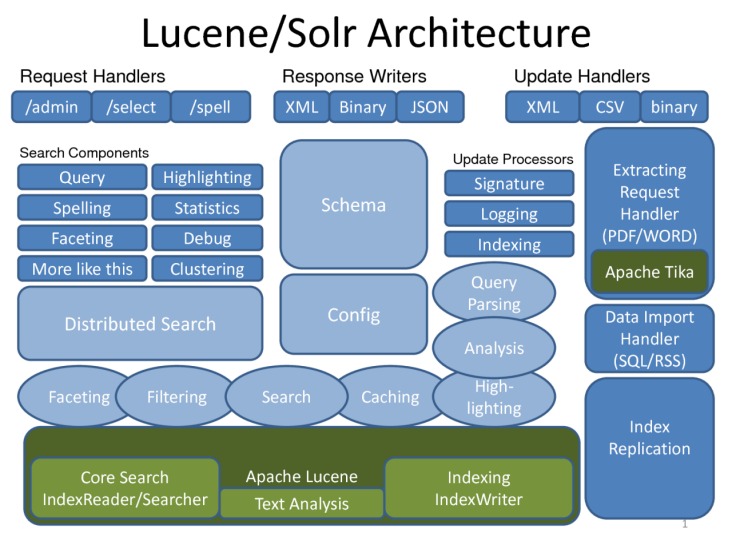
Following are the major building blocks (components) of Apache Solr :
- Request Handler − The requests we send to Apache Solr are processed by these request handlers. The requests might be query requests or index update requests. Based on our requirement, we need to select the request handler. To pass a request to Solr, we will generally map the handler to a certain URI end-point and the specified request will be served by it.
- Search Component − A search component is a type (feature) of search provided in Apache Solr. It might be spell checking, query, faceting, hit highlighting, etc. These search components are registered as search handlers. Multiple components can be registered to a search handler.
- Query Parser − The Apache Solr query parser parses the queries that we pass to Solr and verifies the queries for syntactical errors. After parsing the queries, it translates them to a format which Lucene understands.
- Response Writer − A response writer in Apache Solr is the component which generates the formatted output for the user queries. Solr supports response formats such as XML, JSON, CSV, etc. We have different response writers for each type of response.
- Analyzer/tokenizer − Lucene recognizes data in the form of tokens. Apache Solr analyzes the content, divides it into tokens, and passes these tokens to Lucene. An analyzer in Apache Solr examines the text of fields and generates a token stream. A tokenizer breaks the token stream prepared by the analyzer into tokens.
- Update Request Processor − Whenever we send an update request to Apache Solr, the request is run through a set of plugins (signature, logging, indexing), collectively known as update request processor. This processor is responsible for modifications such as dropping a field, adding a field, etc.
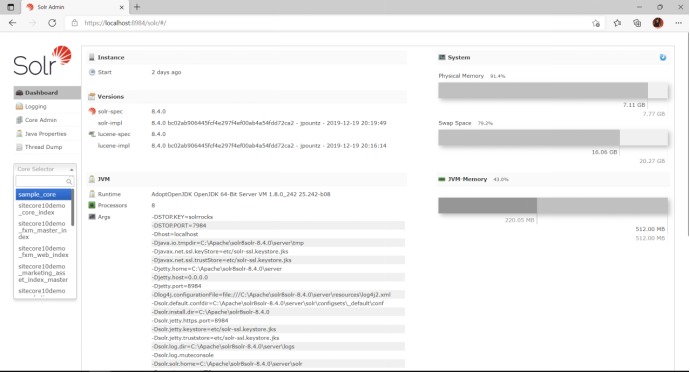
Solr Admin:
- Admin Dashboard:
- Query Window:
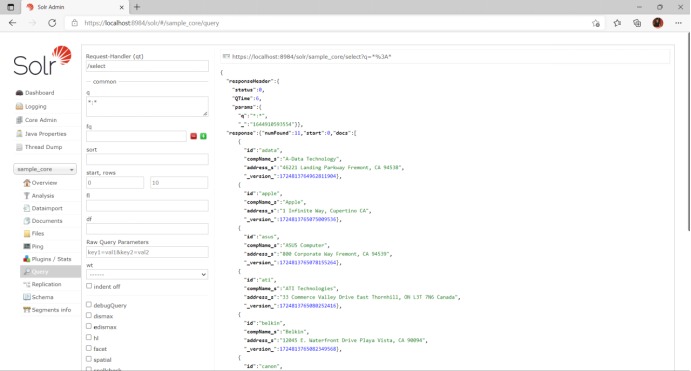
Features:
- Restful APIs : To communicate with Solr, it is not mandatory to have Java programming skills. Instead you can use restful services to communicate with it. We enter documents in Solr in file formats like XML, JSON and .CSV and get results in the same file formats.
- Full text search : Solr provides all the capabilities needed for a full text search such as tokens, phrases, spell check, wildcard, and auto-complete.
- Enterprise ready : According to the need of the organization, Solr can be deployed in any kind of systems (big or small) such as standalone, distributed, cloud, etc.
- Admin Interface : Solr provides an easy-to-use, user friendly, feature powered, user interface, using which we can perform all the possible tasks such as manage logs, add, delete, update and search documents.
- NoSQL database : Solr can also be used as big data scale NOSQL database where we can distribute the search tasks along a cluster.
- Text-Centric and Sorted by Relevance : Solr is mostly used to search text documents and the results are delivered according to the relevance with the user’s query in order.
Solr Installation:
- Download the latest Apache Solr version from the official website. For me it is 8.11.1 is the most recent release and I am going with this.
- Extract the solr-8.11.1.zip at desired folder
- To start Solr server, Goto bin directory from command prompt and execute the > solr start command to start Solr instance.
References: