The Sitecore App Marketplace for XM Cloud Has Officially Launched
The Sitecore App Marketplace for XM Cloud is now live, opening up extensive possibilities for customizing and extending the platform. This blog consolidates the key development and configuration steps to help you build your first custom app.
I began by setting up a basic standalone application in XM Cloud to understand how the process works. With this capability, you can now create custom tools for your organization—or even apps for the broader Sitecore community. In this blog, we’ll walk through the essential steps to build an app in your development environment and then register and install it in XM Cloud.
What is the Sitecore Marketplace?
The Sitecore Marketplace enables customers, partners, and developers to build and use applications that extend Sitecore’s functionality. This means you can integrate your custom modules into Sitecore XM Cloud through various extension points.
These apps can be:
-
Private (available only to your organization), or
-
Public (shared with anyone using XM Cloud, though the public marketplace is not available yet).
Prerequisites
Before you start, ensure you have the following:
-
Access to Sitecore Cloud Portal – Marketplace apps are currently available only to Organization Owners and Admin users.
-
Development Environment – Node.js 16+ and npm 10+.
-
Basic Web Development Skills – TypeScript and React.
Extension Points: Where Your App Will Appear
When configuring your app, you can choose where in the Sitecore UI it should be visible. Available extension points include:
-
Standalone applications in the Portal
-
Full-screen experiences in XM Cloud
-
XM Cloud site dashboard widgets
-
Page Builder panel applications
-
Page Builder custom fields
Step 1: Create Your App in Cloud Portal
-
Log in to the Cloud Portal using an Admin or Owner account.
-
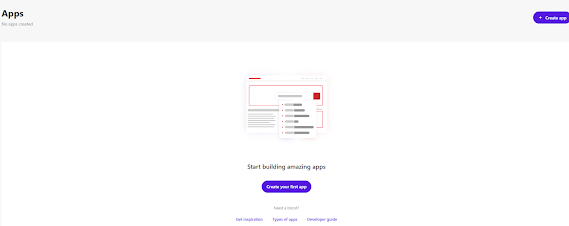
Navigate to Developer Studio > Create App.
-
Enter the details:
-
Descriptive name (max 50 characters).
-
Select Custom as the app type.
-
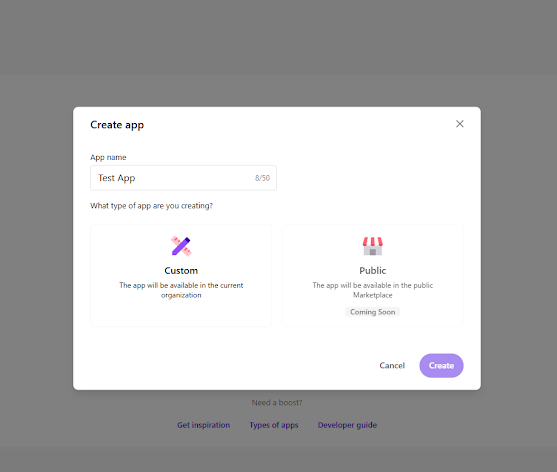
4. Click Create – your app is now registered and ready for configuration.
Step 2: Configure Your App
-
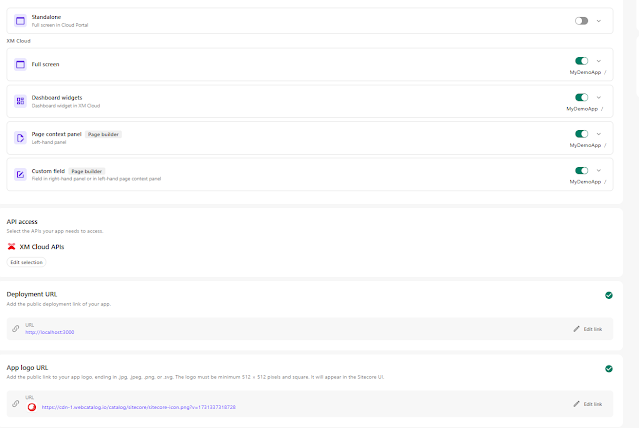
Extension Points: Choose where your app should appear. You can select multiple points and customize the Route URL or Display Name.
-
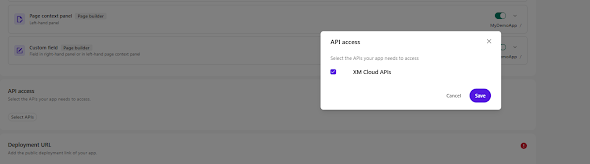
API Access: Select the APIs your app will use. For XM Cloud integration, enable XM Cloud APIs.
-
Development URL:
-
React apps →
http://localhost:5173 -
Next.js apps →
http://localhost:3000
-
-
App Logo: Add a public logo URL (or use a temporary one:
https://cdn-1.webcatalog.io/catalog/sitecore/sitecore-icon.png?v=1731337318728). -
Activate App: Click Activate > Activate.
Step 3: Set Up Your Development Project
Create a Next.js or React app:
Next.js
React
Install required SDK packages:
// utils/hooks/useMarketplaceClient.ts
import { ClientSDK } from "@sitecore-marketplace-sdk/client";
import { useEffect, useState, useCallback, useMemo, useRef } from "react";
export interface MarketplaceClientState {
client: ClientSDK | null;
error: Error | null;
isLoading: boolean;
isInitialized: boolean;
}

export interface UseMarketplaceClientOptions {
retryAttempts?: number; // Default: 3
retryDelay?: number; // Default: 1000ms
autoInit?: boolean; // Default: true
}

const DEFAULT_OPTIONS: Required<UseMarketplaceClientOptions> = {
retryAttempts: 3,
retryDelay: 1000,
autoInit: true,
};

let client: ClientSDK | undefined = undefined;

async function getMarketplaceClient() {
if (client) {
return client;
}
const config = {
target: window.parent,
};
client = await ClientSDK.init(config);
return client;
}

export function useMarketplaceClient(options: UseMarketplaceClientOptions = {}) {
const opts = useMemo(() => ({ ...DEFAULT_OPTIONS, ...options }), [options]);

const [state, setState] = useState<MarketplaceClientState>({
client: null,
error: null,
isLoading: false,
isInitialized: false,
});

const isInitializingRef = useRef(false);

const initializeClient = useCallback(async (attempt = 1): Promise<void> => {
let shouldProceed = false;
setState(prev => {
if (prev.isLoading || prev.isInitialized || isInitializingRef.current) {
return prev;
}
shouldProceed = true;
isInitializingRef.current = true;
return { ...prev, isLoading: true, error: null };
});

if (!shouldProceed) return;

try {
const client = await getMarketplaceClient();
setState({
client,
error: null,
isLoading: false,
isInitialized: true,
});
} catch (error) {
if (attempt < opts.retryAttempts) {
await new Promise(resolve => setTimeout(resolve, opts.retryDelay));
return initializeClient(attempt + 1);
}
setState({
client: null,
error: error instanceof Error ? error : new Error('Failed to initialize MarketplaceClient'),
isLoading: false,
isInitialized: false,
});
} finally {
isInitializingRef.current = false;
}
}, [opts.retryAttempts, opts.retryDelay]);

useEffect(() => {
if (opts.autoInit) {
initializeClient();
}
return () => {
isInitializingRef.current = false;
setState({
client: null,
error: null,
isLoading: false,
isInitialized: false,
});
};
}, [opts.autoInit, initializeClient]);

return useMemo(() => ({
...state,
initialize: initializeClient,
}), [state, initializeClient]);

}
This hook handles:
-
SDK initialization
-
Error handling and retry logic
-
Preventing race conditions
Step 5: Use the Hook in Your App
In your main app component (e.g., App.tsx or pages/index.tsx), import and use the hook.
For Next.js (pages/index.tsx):
import { useState, useEffect } from "react";
import type { ApplicationContext } from "@sitecore-marketplace-sdk/client";
import { useMarketplaceClient } from "../utils/hooks/useMarketplaceClient";

export default function Home() {
  const { client, error, isInitialized, isLoading } = useMarketplaceClient();
  const [appContext, setAppContext] = useState<ApplicationContext>();

  useEffect(() => {
    if (!error && isInitialized && client) {
      client.query("application.context")
        .then((res) => {
          setAppContext(res.data);
        })
        .catch((error) => {
          console.error("Error retrieving application.context:", error);
        });
    }
  }, [client, error, isInitialized]);

  if (isLoading) return <div>Loading...</div>;
  if (error) return <div>Error: {error.message}</div>;

  return (
    <div className="p-4">
      <h1>Welcome to {appContext?.name || 'My Marketplace App'}</h1>
    </div>
  );
}
Step 6: Start Development
Run your app:
Then:
-
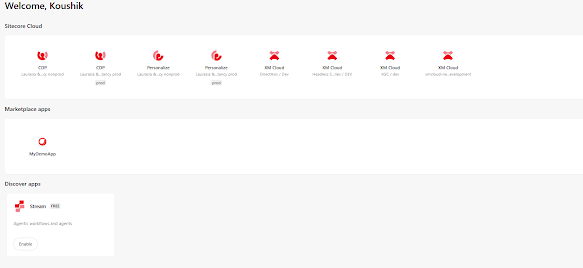
Open your Sitecore Cloud Portal.
-
Navigate to Marketplace.
-
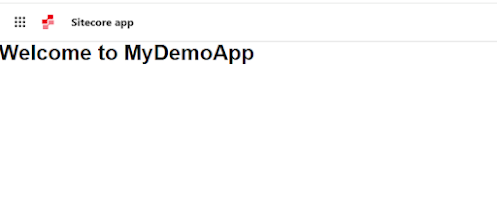
Find your registered app and open it in one of the configured extension points.
-
Your app will now run inside Sitecore with secure communication.
Development Tips
-
Always test your app within Sitecore, not just on localhost.
-
Use the browser console in the Sitecore extension point for accurate logs.
-
Sitecore-specific functionality only works inside extension points.
Conclusion
The Sitecore XM Cloud Marketplace is a powerful way to extend the platform with custom applications tailored to your organization’s needs. By following the steps above, you can create, configure, and register your first app—from setting up a development environment to embedding it seamlessly in XM Cloud.
As the marketplace continues to evolve, it opens new opportunities for developers to innovate and share apps across the Sitecore community. If you’re building for your team today, you’re also preparing for tomorrow’s broader ecosystem.
References
-
Introduction to Sitecore Marketplace – Overview of the platform and capabilities
-
Sitecore Marketplace SDK for JavaScript – SDK reference and examples
-
Understanding Queries – Retrieve data from Sitecore
-
Understanding Mutations – Trigger actions in Sitecore