Identity Resolution in Sitecore CDP
Identity resolution is the process of identifying anonymous guests in Sitecore CDP. When a guest interacts with your brand across different channels and devices, Sitecore CDP uses identity rules to recognize and link that guest.
By default, guests are marked as “visitors.” The IDENTITY event is used to resolve the identity of an anonymous site visitor. When Sitecore receives an IDENTITY event — typically captured during registration, login, or signup — it runs a linking algorithm to match guest data from separate guest profiles based on your organization’s identity rules.
Identity Rules
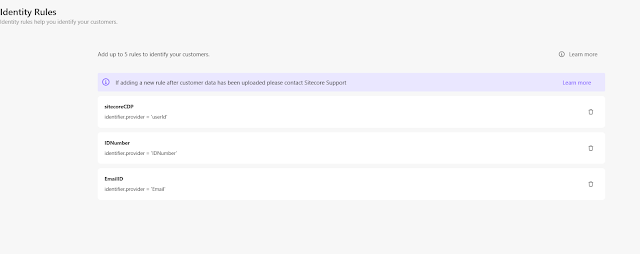
Identity rules are used to identify customers by providing key information such as customer ID, email, etc. In CDP, you can add identity rules as per your organization’s requirements.
Follow the steps below to add identity rules in CDP:
-
Navigate to the Settings icon and click on the Identity Rules menu.

-
From the Identity Rules screen, click Add Rule.
-
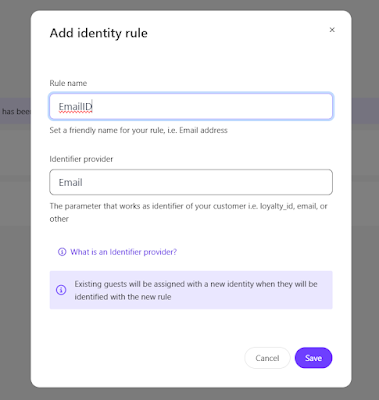
On the Add Identity Rule screen, provide the following values and click Save:
-
Rule name – Enter the name of the identity rule.
-
Identifier provider – Enter the required provider attribute that Sitecore Personalize uses to identify the guest.
For example: Customer_ID, Email, IDNumber
-
-
You can add up to five identity rules.
Identify a Guest
A guest profile is created when a user browses a site. The guest profile is linked to a browser ID. By default, the guest profile type is visitor.
To identify a guest, you need to send an IDENTITY event. If the guest provides the necessary information (such as email or ID number), you can send this event during activities like login, signup, or newsletter subscription.
For example, if you set Email and IDNumber as identity rules, you must send an IDENTITY event that includes a value for either field.
Below is an example of an IDENTITY event:
{
“channel”:”WEB”,
“type”:”IDENTITY”,
“language”:”EN”,
“currency”:”EUR”,
“page”:”home page”,
“pos”:”testsite.com”,
“browser_id”:”d98ddd9e-0df8-52b2-b12e-2926fcca9fa3″,
“identifiers”:[
{
“provider”:”IDNumber”,
“id”:”7603170250391″
},
{
“provider”:”Email”,
“id”:”myemail@gmail.com”
}
]
}
Identity Resolution
The IDENTITY event contains data that enables Sitecore CDP to perform identity resolution. When Sitecore CDP receives an IDENTITY event, it executes a linking algorithm to match guest data from different guest profiles based on your organization’s identity rules.
The following can occur after the linking algorithm runs:
-
No matching profiles, but guest identified:
If no matching guest profiles are found, yet the unidentified guest provides enough identifying information as per your organization’s rules, Sitecore CDP updates the guest type from visitor to customer, indicating that the guest is now identified. This typically happens when an unidentified guest visits your website for the first time and provides valid identifying information. -
No matching profiles and insufficient data:
If no matching guest profiles are found and the visitor does not provide enough identifying information, Sitecore CDP retains the guest profile as a visitor. -
Matching profile found:
If a matching guest profile is found, Sitecore CDP migrates the current session data to the existing customer profile and retires the visitor profile.
Multiple Identifiers
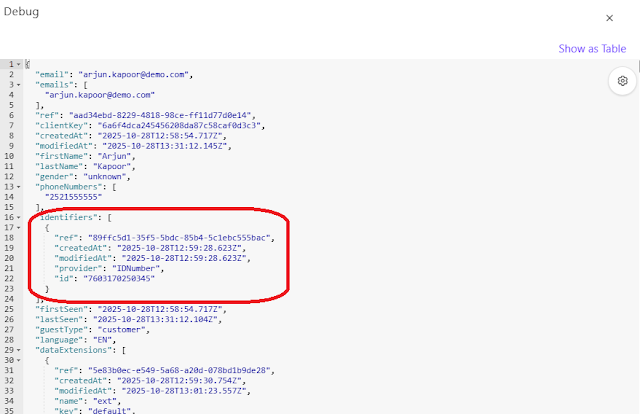
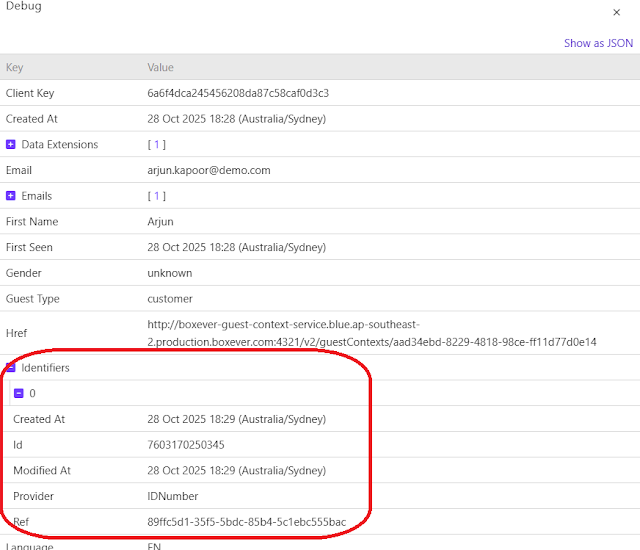
In the real world, a person can be identified in multiple ways — by CRM ID, phone number, email, username, or account ID. Sitecore CDP allows the same flexibility digitally. Each guest profile can store up to five identifiers to support different identification methods.
Debug
If you want to understand the data model and see what information is stored in Sitecore CDP, you can use the debug feature provided by CDP. It helps you view all user fields, data extensions, and related details in a JSON or table format.
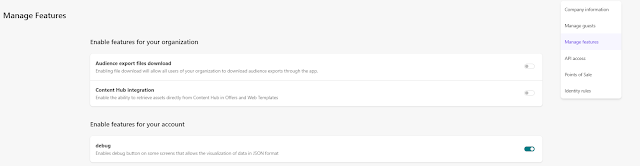
To enable Debug mode, Go to Top Settings Icon and click on Manage Features. There you can enable Debug mode.